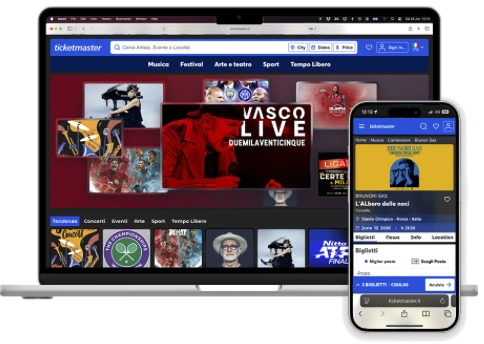
From browsing to the right ticket.
A concept design for Ticketmaster, focused on usability, information clarity and the ticket purchasing experience. It reworks navigation, visual hierarchy and interaction design for two kinds of people: those exploring what’s on, and those who already know which ticket they want.
- Role
- UX/UI design, end to end
- Type
- Concept design, not affiliated with Ticketmaster
- Platforms
- Desktop and mobile
- Method
- Survey, personas, heuristic evaluation, redesign
- Tools
- Figma
Why
A ticketing site serves two very different moments. Some people arrive with a name in mind and want to get to the right date and seat quickly. Others come to browse and need help discovering what’s on.
The current Ticketmaster site is built like a showcase: big banners, few events per screen, search as a secondary element. But most people use it as a search tool. This concept starts from that gap, and it starts from analysis, not from screens.
Research: why people come, and how it goes
After my own analysis of the site, I ran a short survey and looked for external research to check whether the problems I saw were real for other people too.
An independent usability test of Ticketmaster.ie confirmed the main pain points I had found. Its recommendations, in short:
Ticket comparison
Improve visual hierarchy so tickets are easier to compare.
Order summary
Add a summary step before payment.
Navigation
Make the header persistent, or add contextual navigation.
Search and filters
Allow more flexible and targeted exploration.
Artist vs event
Make the difference between the artist page and the event page clear.
Consistency
Keep visuals and information consistent through the purchase flow.
Three ways to look for a ticket
The research gave shape to three personas. They are not demographics: they are three different ways of arriving on the site, and the redesign has to serve all three on the same pages.
- Goal
- Discover something interesting without a set plan.
- Behaviour
- Explores categories and suggestions on the home page.
- Needs
- A clear, engaging overview and filters for exploring.
- Goal
- Find a specific event or artist, fast.
- Behaviour
- Types a name in search and goes straight to purchase.
- Needs
- Precise search, clear results, a short path to buy.
- Goal
- Find an event by genre, without a name or place in mind.
- Behaviour
- Applies category, date and city filters, compares before choosing.
- Needs
- Strong filters, comparison, clear availability and prices.
The analysis: a heuristic evaluation
I evaluated the three pages that matter most on the way to a ticket: home, category and event detail, on desktop and mobile. Every strength, pain point and warning is numbered on the screen and tied to one of Jakob Nielsen’s ten usability heuristics, so each finding rests on a principle, not on taste. The numbers match the markers on each screen.
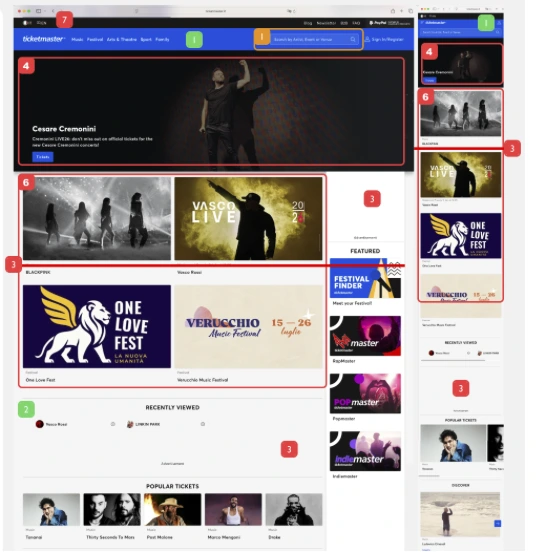
Home
- 1Brand consistencyH4 · Consistency and standards
- 2Recently viewedH6 · Recognition rather than recall
- 8Easy access to subcategories from the menuH7 · Flexibility and efficiency of use
- 3Few events visible without scrollingH7 · Flexibility and efficiency of use
- 4A static hero banner fills the first screenH8 · Aesthetic and minimalist design
- 5White space with no purposeH8 · Aesthetic and minimalist design
- 6Few events and categories on the pageH7 · Flexibility and efficiency of use
- 7Space taken by secondary barsH8 · Aesthetic and minimalist design
- 8Search is there, but could do much moreH7 · Flexibility and efficiency of use
A showcase page for a search behaviour: the first screen shows one event, and search is not the centre.
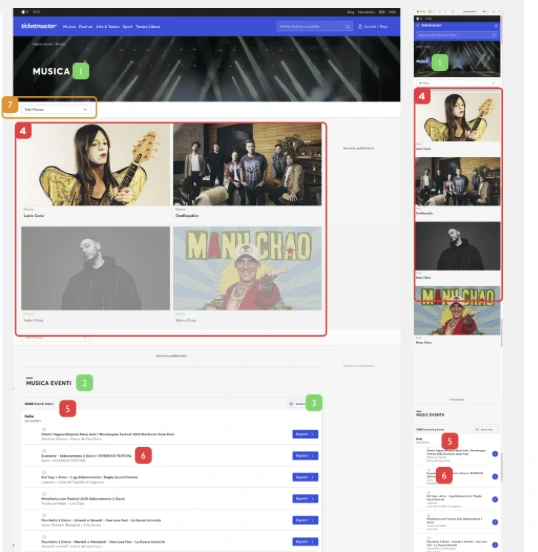
Category page
- 1The title clearly identifies the page, though it is too small on mobileH1 · Visibility of system status
- 2Every event is reachable from the Music sectionH7 · Flexibility and efficiency of use
- 3Filter by dateH7 · Flexibility and efficiency of use
- 4Recommended artists are useful, but limited to four and take a lot of spaceH8 · Aesthetic and minimalist design
- 5More than 1,000 events and no way to filter themH7 · Flexibility and efficiency of use
- 6Unclear visual hierarchy in the listH8 · Aesthetic and minimalist design
- 7The category switch is underused, and when you scroll it no longer says which category you are inH1 · Visibility of system status
- 8Events in other regions sit at the bottom with no filterH7 · Flexibility and efficiency of use
A Researcher has more than a thousand results and only one filter.
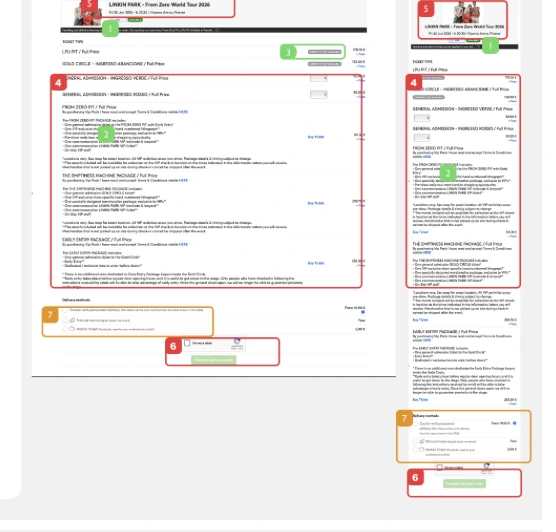
Event detail
- 1A link to more informationH10 · Help and documentation
- 2Plenty of event information without searchingH6 · Recognition rather than recall
- 3Availability indicatorH1 · Visibility of system status
- 4Information overload: ticket details blend into everything elseH8 · Aesthetic and minimalist design
- 5Weak hierarchy: you have to look for the place and timeH6 · Recognition rather than recall
- 6No summary of the tickets selected or of the totalH1 · Visibility of system status
- 7Choosing the delivery method is useful, but too early in the flowH8 · Aesthetic and minimalist design
The page where people actually buy is the hardest one to read, and it never tells you what you are buying.
The ten heuristics, one by one
Putting the three pages together gives a verdict on each of Nielsen’s ten heuristics. The numbers in brackets point to the findings above. The pattern is clear: the site is honest and readable in its language, but weak on efficiency and on hierarchy, exactly where people searching for a ticket need it most.
| # | Heuristic | Verdict | Evidence from the analysis | What the redesign does |
|---|---|---|---|---|
| 1 | Visibility of system status | Partly | Works: availability indicator (Event 3); the page title says where you are (Category 1). Fails: no summary of tickets or total (Event 6); the category is lost when you scroll (Category 7). | A purchase summary bar always visible; the category stays in view as title and filter. |
| 2 | Match between system and the real world | Works | Categories use everyday words: Music, Festivals, Arts & Theatre, Sport. | Same language, extended to genres people already use (pop, rock, jazz…). |
| 3 | User control and freedom | Partly | Works: every event reachable from Music (Category 2); recently viewed lets you go back (Home 2). Fails: the category switch is hidden and underused (Category 7). | Removable recently viewed chips, one way to clear all filters, a clear Featured / All events switch. |
| 4 | Consistency and standards | Partly | Works: consistent brand (Home 1). Fails: filters change from page to page; artist and event pages are easy to confuse (external usability report). | City, Dates and Price in the same place on home and category; one consistent layout for events. |
| 5 | Error prevention | Partly | Works: availability is shown before you choose (Event 3). Fails: with no summary it is easy to buy the wrong quantity (Event 6); delivery is chosen too early (Event 7). | Quantity and total always visible; sold-out dates marked in the list before you open them. |
| 6 | Recognition rather than recall | Partly | Works: recently viewed (Home 2); event information without searching (Event 2). Fails: place and time have to be looked for (Event 5). | Artist, title, venue, date and time in one block under the image. |
| 7 | Flexibility and efficiency of use | Fails | Works: subcategories from the menu (Home 8); a date filter (Category 3). Fails: 1,000+ events with no filters (Category 5); few events per screen (Home 3, 6); search underused (Home warning). | Search at the centre with quick filters; full filters on category; a three-level menu. |
| 8 | Aesthetic and minimalist design | Fails | Fails: static hero, empty and wasted space (Home 4, 5, 7); four artists filling a screen (Category 4); unclear hierarchy and information overload (Category 6, Event 4). | More events per screen, compact artist row, tickets reduced to price and quantity, extra options on request. |
| 9 | Help users recognise, diagnose and recover from errors | Not covered | Error states (payment, failed checkout) were outside the scope of this analysis. | Not addressed in this concept. |
| 10 | Help and documentation | Works | A link to more information on the event (Event 1). | Kept: more purchase options and information open on request. |
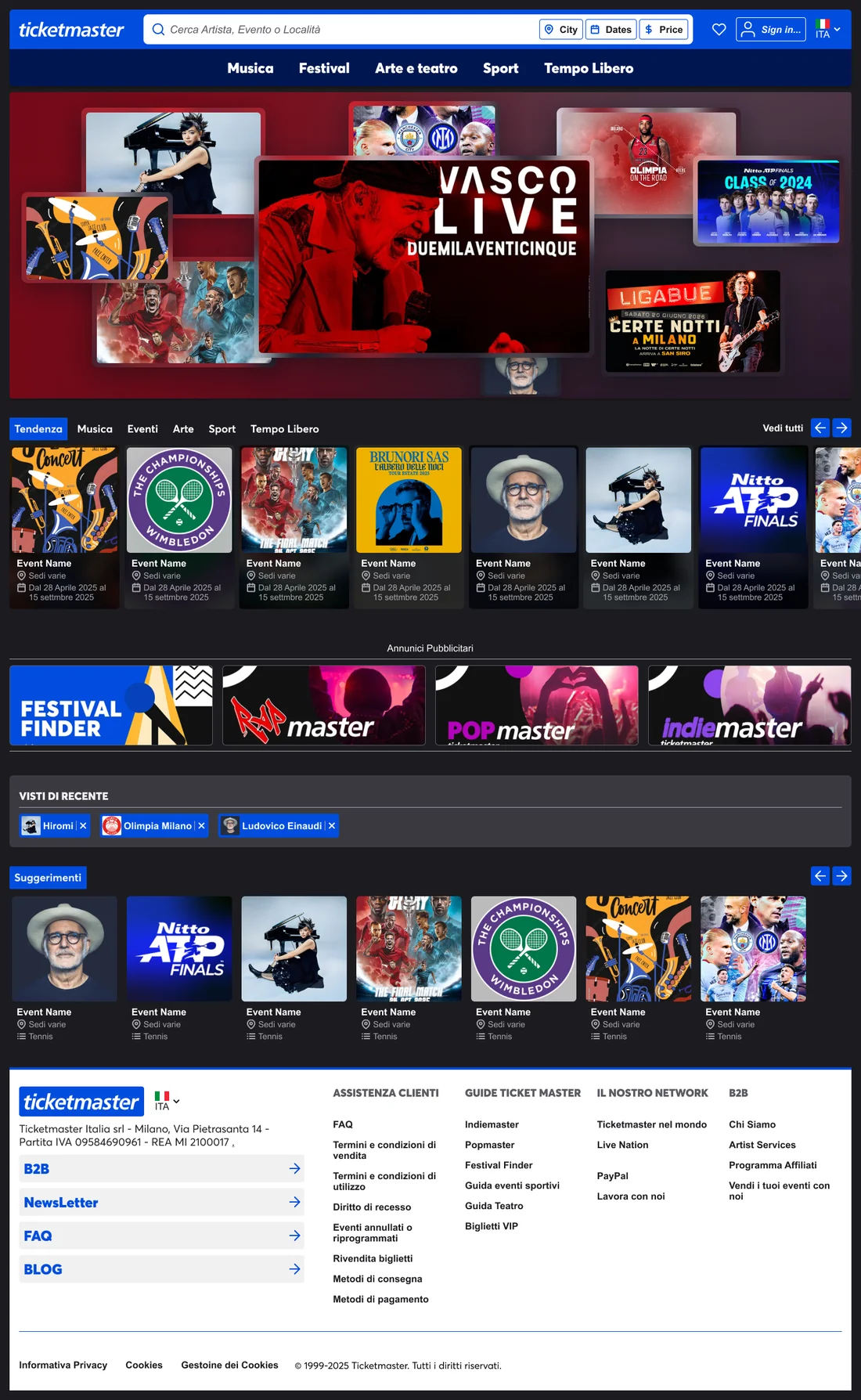
Home: search first, discovery after
Search with quick filters
One search bar for artist, event or venue, with City, Dates and Price one click away.
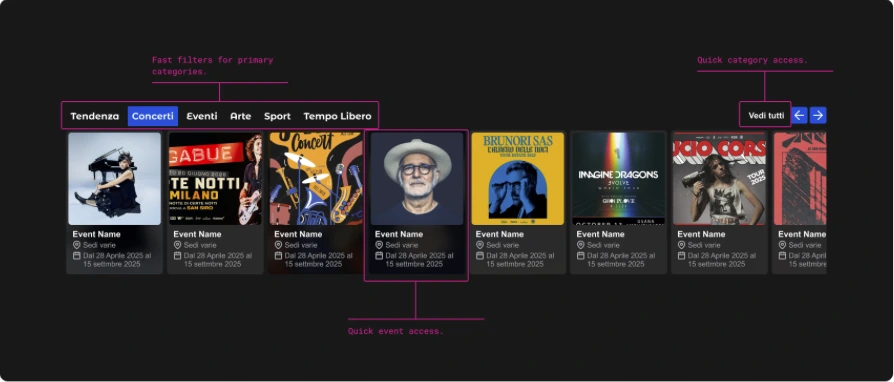
Trending by category
Tabs for music, events, art and sport sit above a scrollable row of events.
Recently viewed
The last artists you looked at come back as chips, each removable.
Ads kept apart
Promotions are labelled and separated, so they don’t compete with the events.

Navigation: many categories, three levels of choice
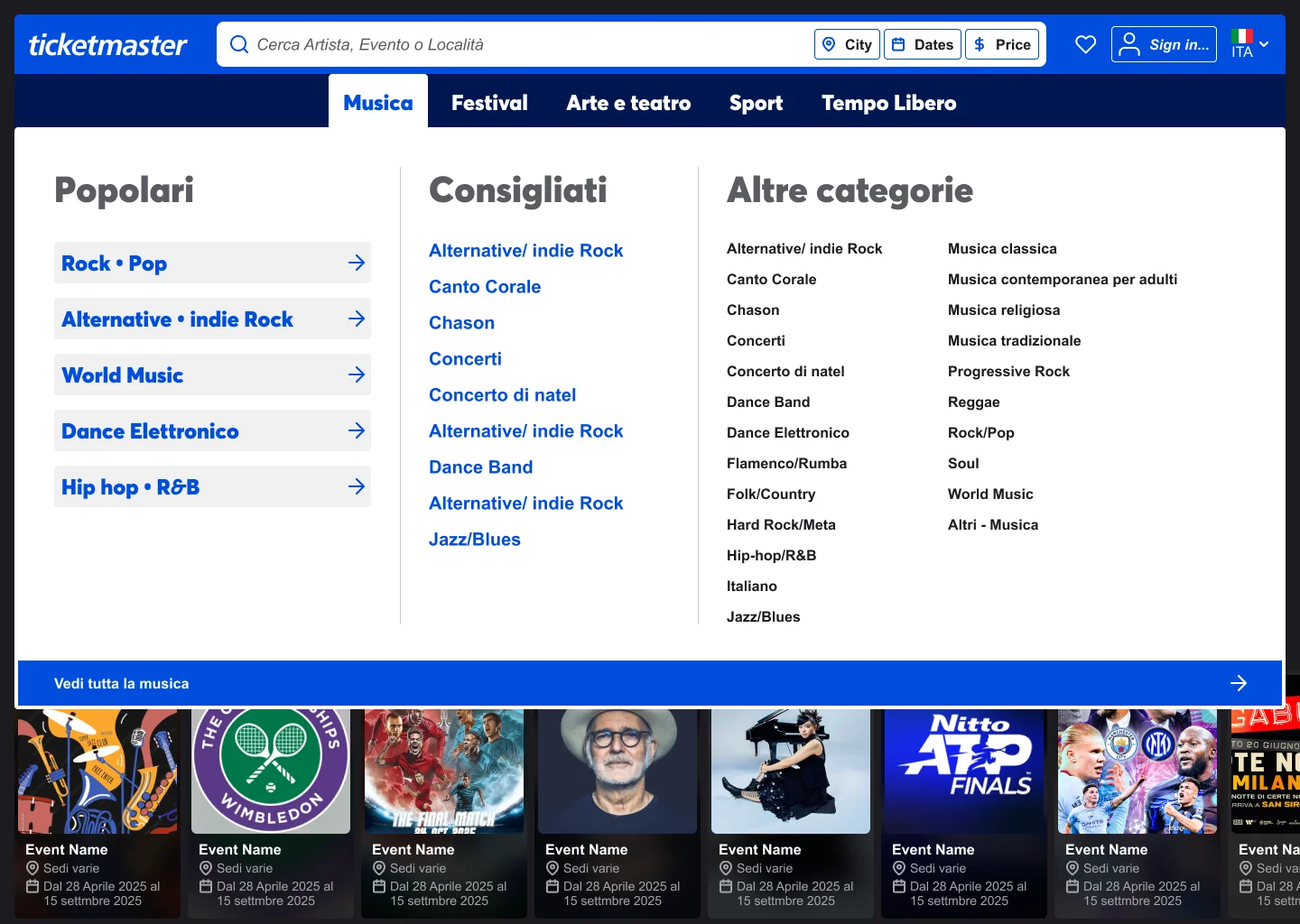
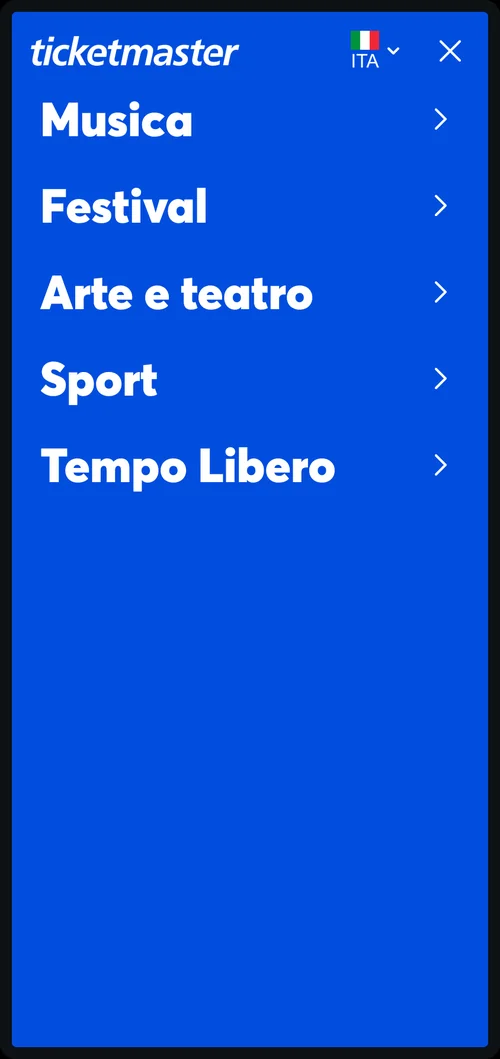
Music alone has dozens of genres. Instead of one long list, the menu offers three levels: the most popular genres as large shortcuts, a set of recommendations, and the complete list for people who know exactly what they want.
Popular
Five big shortcuts for the genres most people look for.
Recommended
A short, curated list to help people who are browsing.
Everything else
The full list of categories, scannable in two columns, with a clear way to see all music.
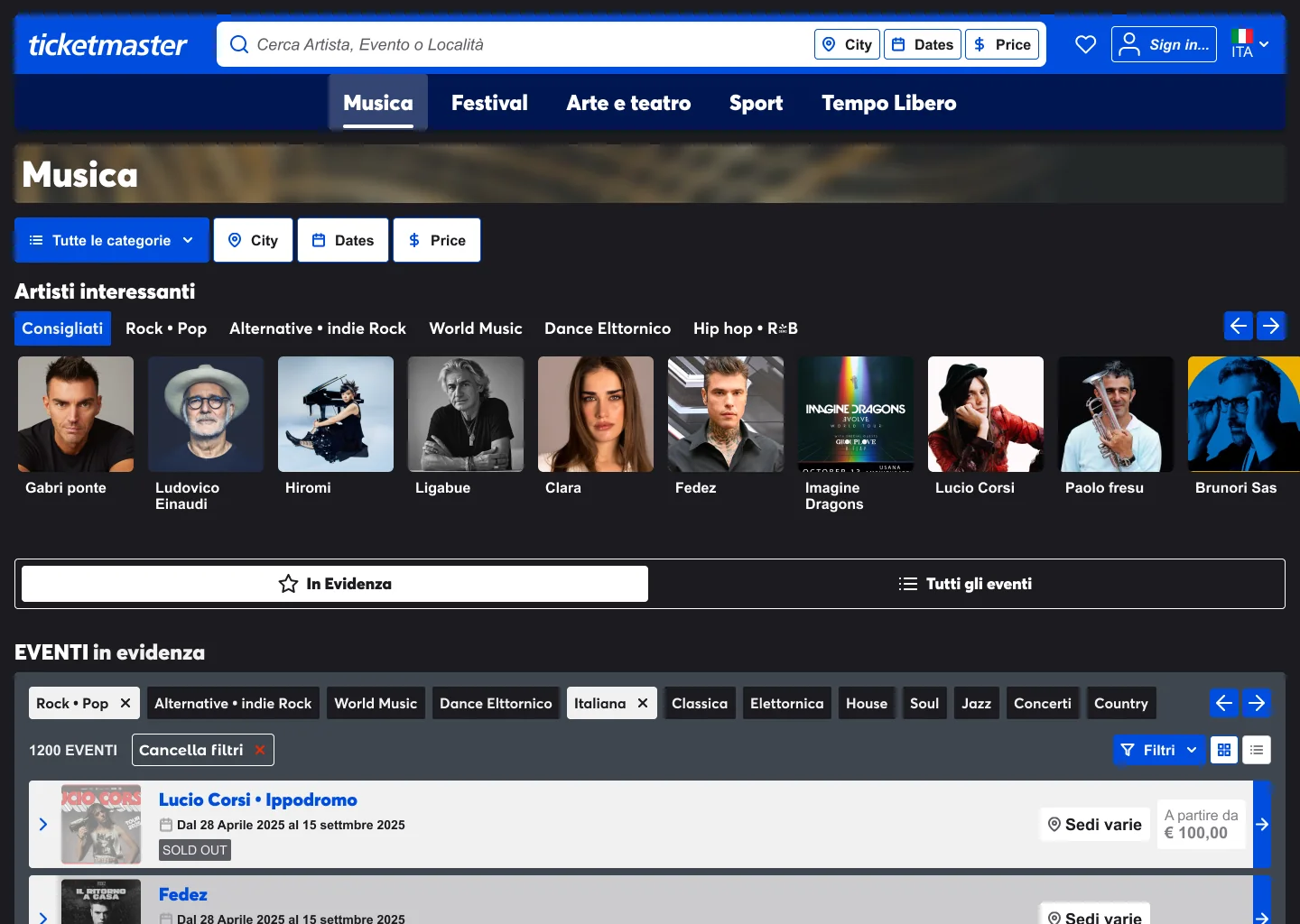
Category page: from genre to event
Filters at the top
Category, City, Dates and Price stay in the same place as on the home page.
Artists by genre
A row of artists, grouped by subgenre, for people who browse by name.
Featured or everything
A clear switch between highlighted events and the full list.
Readable results
Genre chips, the number of events, a single way to clear filters, and a grid or list view.
Price and availability
Each event shows where it is, the starting price, and when it’s sold out.
Event page: know what you are buying
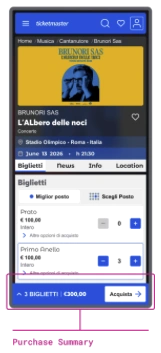
Event at a glance
Artist, title, venue, date and time in one block, readable without searching.
Best seat or seat map
Two clear ways to choose: let the site pick the best seats, or choose on the map.
Tickets you can compare
Each ticket type shows its price and a quantity control. Extra options open on request.
Purchase summary
A bar that always shows how many tickets you have and the total, with the colour reserved for the purchase action.
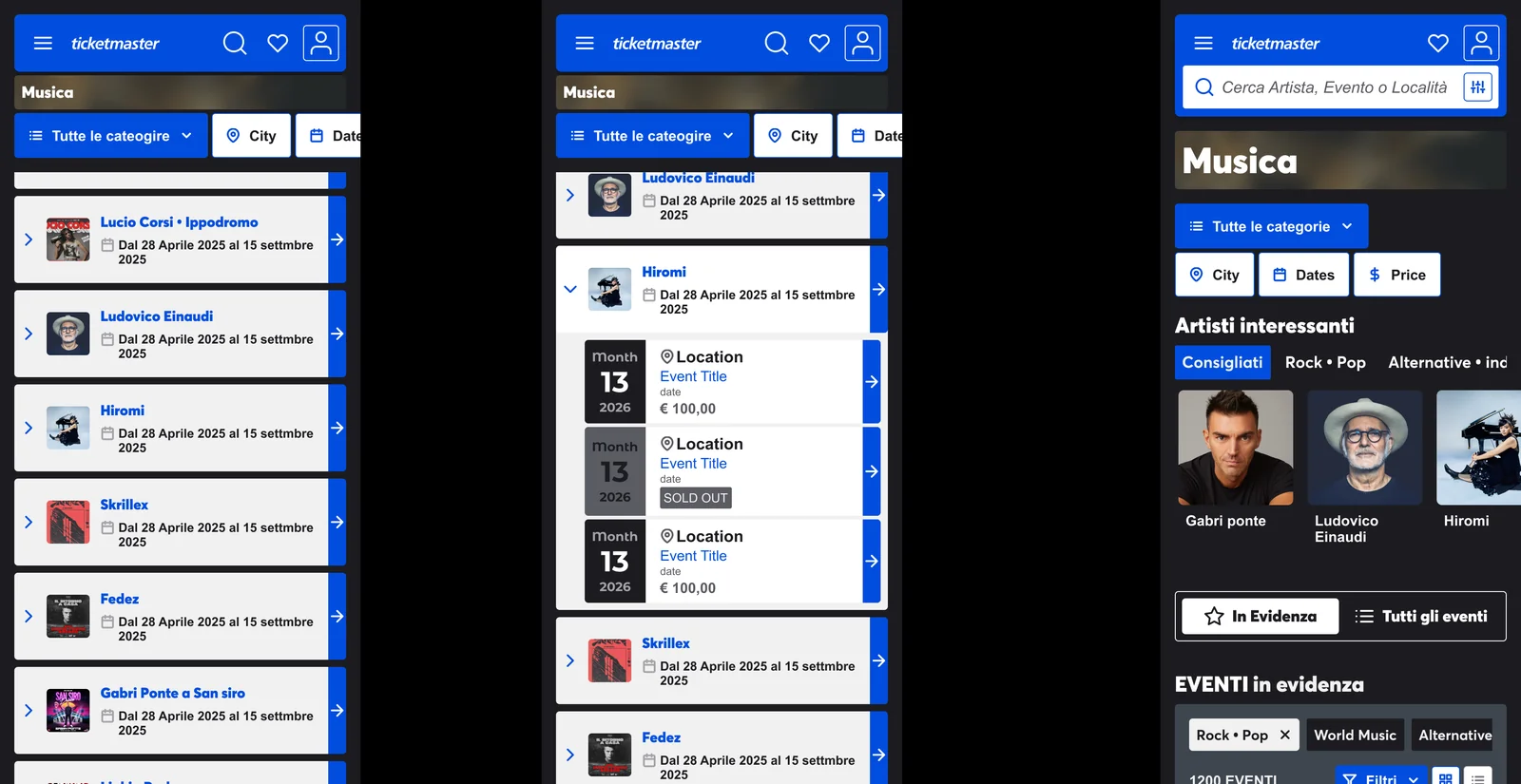
On mobile: dates without leaving the list
On a phone every extra page costs time. An event in the list opens in place to show its dates, venues and prices, including which dates are sold out, so people can compare and pick without losing their place.
Conclusions
The Ticketmaster redesign presented here is based on personal analysis of the main strengths and weaknesses of the current user experience.
The concept proposes targeted solutions to simplify navigation, enhance information clarity, and make ticket purchasing more intuitive.
However, as an individual exploration, not all aspects of the interface and user flow have been fully examined or validated.